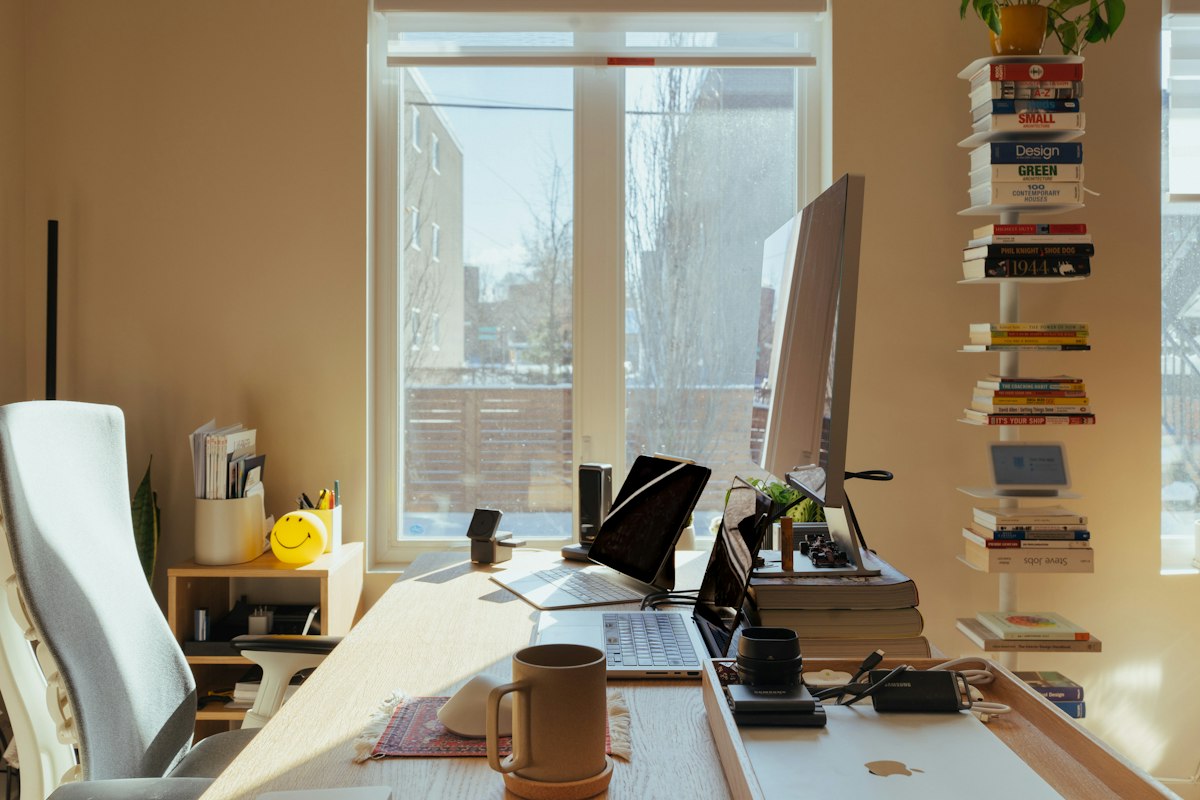
Home Office Interior Design: Professional Strategies for Productive Workspaces
The transition from a corporate cubicle to a residential workspace involves more than just finding a flat surface for a laptop. Many professionals find that working from a kitchen island or a soft sofa eventually leads to physical discomfort and a noticeable dip in focus. A dedicated environment serves as a psychological trigger, signaling to the brain that it is time to transition from domestic life into a state of deep work. Creating this boundary is the first step in maintaining a healthy work-life balance while working remotely.
Effective home office interior design addresses the unique challenges of the residential setting, such as limited square footage, domestic distractions, and inadequate lighting. It is not merely about aesthetic appeal; it is about engineering a space that supports cognitive function and physical health over long hours. This discussion explores the practical frameworks for building an environment that feels both professional and personal, ensuring that every design choice serves a functional purpose.
Related posts
Luxury House Interior Design
True luxury house interior design transcends the simple accumulation of expensive items. It is an intentional practice that...
Read more →
Low Budget Small Office Interior Design: Professional Workspace Transformation
Starting a business or managing a small team often means working within tight physical and financial constraints. You...
Read more →
High-Performance Office Room Design for Modern Professionals
The physical space where you work acts as a silent partner in your daily output. It either facilitates...
Read more →
Luxury Home Interior Design
Creating a luxury home interior is far more than a simple exercise in purchasing expensive items. It is...
Read more →We will examine the foundational elements of workspace optimization, including ergonomic principles, lighting configurations, and the psychological impact of color and texture. Whether you are transforming a full spare room or carving out a professional nook in a multi-purpose area, the goal remains the same: to create a zone where productivity happens naturally. By focusing on high-quality materials and thoughtful layouts, you can build a workspace that remains relevant and comfortable for years to come.
Throughout this article, we will look at specific furniture standards, technical requirements for modern hardware, and the subtle design cues that improve mental clarity. You will find actionable insights into budgeting for high-end equipment versus entry-level solutions, ensuring that your investment provides the highest possible return in terms of health and output. Let's explore the components that define a high-performance home office.
Key takeaways
- Prioritize Ergonomics: Invest in adjustable furniture that supports the natural curvature of the spine to prevent long-term musculoskeletal issues.
- Layer Your Lighting: Combine natural light with task and ambient sources to reduce eye strain and regulate your circadian rhythm.
- Control the Clutter: Use integrated storage and cable management systems to maintain a clean visual environment, which reduces mental fatigue.
- Personalize for Performance: Incorporate elements like biophilic design or specific color palettes that personally enhance your focus and creativity.
Defining the Workspace Purpose
Before buying furniture, you must define the primary activities that will occur in the space. A graphic designer requires different desk depth and lighting than a financial analyst or a software engineer. Consider the "work zones" within your office. Do you spend most of your time on video calls, or do you need expansive surface area for physical documents and multiple monitors? Identifying these needs early prevents expensive mistakes in the procurement process.
The Logic of Layout
The placement of your desk is the most significant decision in home office interior design. Facing a window provides natural light and a visual break, but it can cause glare on screens. Conversely, facing a wall can minimize distractions but may feel claustrophobic. Many professionals prefer the "command position," where the desk faces the door but is not directly in line with it. This layout provides a sense of security and control over the environment.
If space is tight, consider an L-shaped desk. This configuration offers a primary work surface for your computer and a secondary area for administrative tasks or creative projects. For those in shared living spaces, a "cloffice" (closet-office) or a room divider can provide the necessary visual separation to signal that you are "at work" to other household members.
The Science of Ergonomic Comfort
Ergonomics is the foundation of any professional workspace. Sitting for eight hours a day in a chair designed for dining or lounging is a recipe for chronic pain. When identifying the right chair, look for adjustable lumbar support, seat depth, and armrests. The goal is to achieve a 90-90-90 position: knees at a 90-degree angle, hips at 90 degrees, and elbows at 90 degrees while typing.
High-End vs. Budget Seating
Investment in a high-quality ergonomic chair, such as those from Herman Miller or Steelcase, often comes with a higher upfront cost, sometimes exceeding $1,000. However, these chairs are engineered for 12+ hours of daily use and typically carry 10-to-12-year warranties. Budget options in the $200 to $400 range can be effective but often lack the long-term durability and fine-tuned adjustability of professional-grade models. Consider the cost per day over a decade; a premium chair often costs less than a daily cup of coffee.
The Rise of Standing Desks
Electric height-adjustable desks have become a staple in modern home office interior design. They allow you to alternate between sitting and standing, which improves circulation and energy levels. When choosing a standing desk, check the weight capacity and the stability at full height. Cheaper models may wobble when extended, which is frustrating during intense typing or video calls. Look for dual-motor systems for smoother, quieter transitions.
Lighting Schemes for Focus and Energy
Lighting is often overlooked, yet it is one of the most influential factors in productivity. Poor lighting leads to headaches and lethargy, while overly harsh fluorescent light can cause anxiety. The ideal strategy involves layering three types of light: natural, ambient, and task.
Optimizing Natural Light
Position your desk perpendicular to windows. This prevents the sun from shining directly into your eyes or creating a reflection on your monitor. Use sheer curtains or solar shades to diffuse intense afternoon light. Natural light exposure during the day is linked to better sleep quality at night, which directly affects your performance the following morning.
Artificial Light Specifications
For ambient lighting, avoid overhead fixtures that cast heavy shadows. Instead, use floor lamps that bounce light off the ceiling for a soft, even glow. Task lighting, such as an adjustable desk lamp, should be placed on the side opposite your dominant hand to minimize shadows while writing. Look for LED bulbs with a color temperature between 4000K and 5000K, as this mimics daylight and keeps the brain alert.
Color Psychology and Aesthetic Choices
The colors you choose for your home office interior design significantly impact your mood. While stark white might seem clean, it can feel clinical and cold. Soft grays or off-whites provide a neutral backdrop without the harshness. If your work requires intense focus, consider shades of blue, which are known to lower heart rates and improve concentration.
For creative professionals, touches of yellow or orange can stimulate energy and innovation. Green is an excellent choice for those who work long hours, as it is the easiest color for the human eye to process and evokes a sense of calm. Instead of painting the entire room, you might use these colors in an accent wall, through artwork, or even via indoor plants.
Storage and Organization Systems
Visual clutter leads to mental clutter. A disorganized desk forces the brain to process extra information, reducing its capacity for the task at hand. Integrated storage solutions are essential for maintaining a professional environment. Consider vertical space by installing floating shelves or tall bookcases to keep the floor clear and the room feeling larger.
Cable Management Strategies
Nothing ruins a beautiful home office interior design faster than a "rat's nest" of cables under the desk. Use cable trays that attach to the underside of the desk to hide power strips and bricks. Weighted cable holders on the desktop can keep charging cords from slipping away when not in use. For a truly clean look, wireless peripherals (keyboard, mouse, and headphones) are worth the investment, though you must account for battery management.
Designing for Video Conferencing
In the modern remote landscape, your office is also your digital stage. The area behind you—the background—needs to look professional and intentional. Avoid cluttered bookshelves or open doorways that might show household traffic. A curated bookshelf, a piece of art, or a simple textured wallpaper can provide a sophisticated backdrop for virtual meetings.
Acoustics also play a role. Hard surfaces like hardwood floors and bare walls cause echoes. Adding a rug, heavy curtains, or acoustic wall panels can significantly improve the quality of your audio. If you are frequently on calls, investing in a dedicated external microphone and a ring light will elevate your professional presence far beyond what a standard laptop camera and mic can offer.
Budgeting for Your Transformation
When planning your budget, categorize items into "essential" and "aesthetic." High-quality seating and a reliable desk are non-negotiable essentials for health. Lighting and technology follow closely behind. Decor, high-end flooring, and designer hardware are aesthetic choices that can be added over time. A mid-range professional home office setup typically costs between $1,500 and $3,500, depending on the technology and furniture brands chosen.
FAQ
What is the most important element in home office interior design?
While aesthetics are important, ergonomics is the most critical element. A beautiful office is useless if you cannot sit in it for more than an hour without pain. Investing in a high-quality chair and an adjustable-height desk provides the foundation for long-term productivity and physical health.
How can I create a home office in a small apartment?
Look for underutilized spaces like large closets, wide hallways, or the area under a staircase. Use "floating" furniture like wall-mounted desks to save floor space. Additionally, use vertical storage to keep the area organized. Mirroring the wall or using light colors can also make a small office nook feel more expansive.
Are standing desks actually better for productivity?
Standing desks are not necessarily better for focus, but they are excellent for energy management. Alternating between sitting and standing prevents the lethargy that comes with physical inactivity. Most users find that standing is better for administrative tasks or calls, while sitting is better for deep, analytical work.
What are the best colors for a windowless office?
In spaces without natural light, avoid dark or saturated colors that can make the room feel like a cave. Opt for light, reflective colors like warm whites, pale blues, or soft greens. Ensure you have high-quality LED lighting with a high Color Rendering Index (CRI) to make the colors appear natural and vibrant.
How do I hide computer cables effectively?
The most effective method is using a combination of under-desk cable trays and cable sleeves. Trays hold the bulk of the wires and power strips, while sleeves bundle the cables that must run to the floor or the wall. Using a desk with built-in grommet holes also allows you to route cables directly through the surface for a cleaner look.
Conclusion
Professional home office interior design is an investment in your career and your long-term well-being. By moving away from temporary, makeshift setups and toward a curated, ergonomic environment, you create a space that respects the demands of your work. The key is to balance the technical requirements of your hardware with the comfort of a residential setting. When you prioritize lighting, ergonomics, and organization, you build a workspace that does more than just look good—it enables you to perform at your absolute best every single day.